Google

27 April 2018

Bye Office 365 Video, Welcome Microsoft Stream

Microsoft Office 365 VideoLast year, Microsoft released a new corporate video-sharing service, Microsoft Stream, that will eventually replace Office 365 Video. Therefore, my book Office 365 from Scratch had to be updated with a new chapter, and the kalmstrom.com Tips section needed a new article.

As you might have seen earlier, the new edition of Office 365 from Scratch has been on the market for a while, and a new article and demo have also been created.

Office 365 E3 edition
Microsoft Stream is intended for video sharing within an organization, and it can be used both stand-alone and integrated in Office 365. There are different Plans with more or less features, but in the demo below I am using the Stream edition that is included in the Enterprise E3 Office 365 subscriptions.

Transition from Video
Office 365 Video was launched as late as 2015, so it is also a fairly new product. Despite this, Microsoft decided to create another video service. Microsoft has promised a smooth transition from Video to Stream, but the deprecation of Video will of course still create problems for users and administrators.

Even if Microsoft can transfer all content from Office 365 Video into Stream and make sure that existing Video embed codes and links will redirect to the Stream content, people have to re-learn after so recently having gotten used to Video. The process will be easier if users see that Stream is better than Video, and in my opinion the switch is worth the trouble. Stream has several benefits.

SharePoint groups
Office 365 Groups
Stream is much more than just a password-protected version of YouTube. In the demo below I just show the basics, but in Office 365 from Scratch I describe how Stream is connected to Office 365 Groups. This means that Stream has two ways to categorize videos: channels to organize them by content and groups to limit access to certain videos.

Auto-generated transcripts
Stream can generate a transcript when the video sound is in English or Spanish. I am sure Stream transcripts will support more languages in the future, because even if you should edit the transcript to make it perfect this is a very useful feature.

The Stream search feature uses the transcripts, so editing them is important also to optimize the search. It is easy to edit the transcripts, as they are shown beside the videos and you can follow the audio and text closely.

Share videos
Stream makes it easy to share videos and channels within Office 365, and the permissions are kept in the sharing. You can for example:
  • Embed a video in a SharePoint Online wiki page.
  • Use the Stream web part to insert a video or channel in a modern SharePoint page.
  • Add a tab with a Stream video or channel in a Teams channel.
  • Paste a Stream video link into a Yammer conversation.
  • Paste a Stream video link into a OneNote page.
  • Embed a Stream video in a Sway.

You can find much more information about Stream and other Office 365 services in my book. Office 365 is being enhanced continuously, and new features are added each month. With Stream, Microsoft has given us a powerful tool for internal video sharing – I just wish that it had been published instead of Video from the beginning!

Peter Kalmstrom
CEO and Systems Designer
kalmstrom.com Business Solutions

16 April 2018

Enhanced Checklist And New Views In Updated Kanban Task Manager

Kanban Task Manager for SharePoint logotype A few months ago, we released a new version of the Kanban Task Manager SharePoint editions. It had several new good features, and we got positive customer feedback for the enhancements.

Now we have released an update of Kanban Task Manager, giving more possibilities to these features. Two new views, the Daily Trend and the Day Report, have also been added in this version. At this time, we have only released the sandboxed solution, but we will release the add-in very soon.

Kanban Task Manager
Kanban Task Manager is among the most popular kalmstrom.com solutions. It helps a workgroup visualize and manage their tasks or projects on a virtual kanban board in SharePoint.

There are two SharePoint editions of Kanban Task Manager: sandboxed solution and add-in/app. The sandboxed solution is uploaded to the solutions gallery in the root site of a SharePoint site collection, while the add-in can be installed from SharePoint Store to the site where it should be used. The add-in can also be downloaded from kalmstrom.com website to the organization’s App Catalog and installed from there.


Enhanced Checklist feature
Checklist icon One of the useful Kanban Task Manager features is the Checklist. Once you enable this feature, you can add a checklist to any complicated task and keep track of the work done in a simple way.

In the new version, the kalmstrom.com developers have enhanced this feature and made it more user friendly. Now the task card displays the checklist count if you have added a checklist to that task. Also, by dragging and dropping the checklist items, you can change their sequence or even remove them.

The New Kanban Views
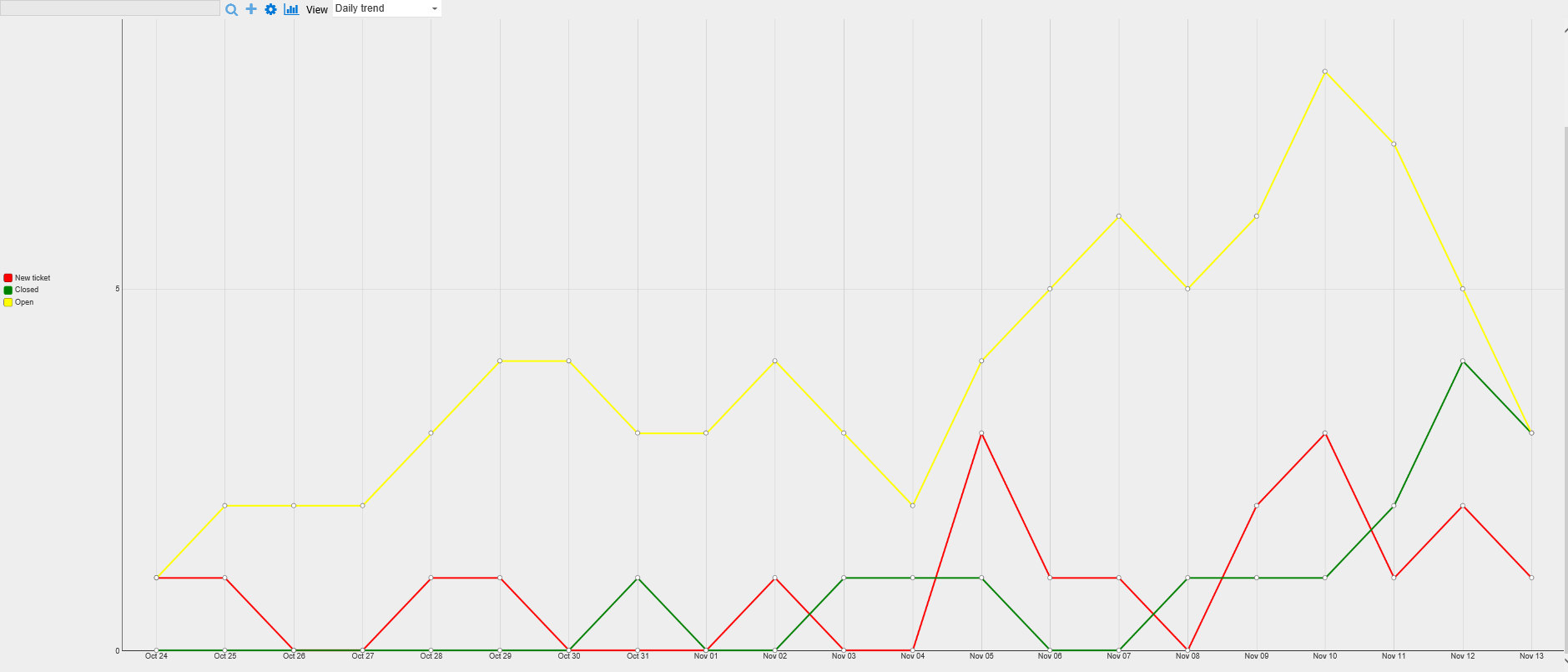
Kanban Task Manager has various views where you can study the tasks from different aspects, and we have now added two more views: the Daily Trend and the Day Report. The Daily Trend view displays the statuses of all tasks from the last 30 days in a line chart representation. The line chart shows the number of tasks that are open, closed or have been created each day.
Daily Trend image
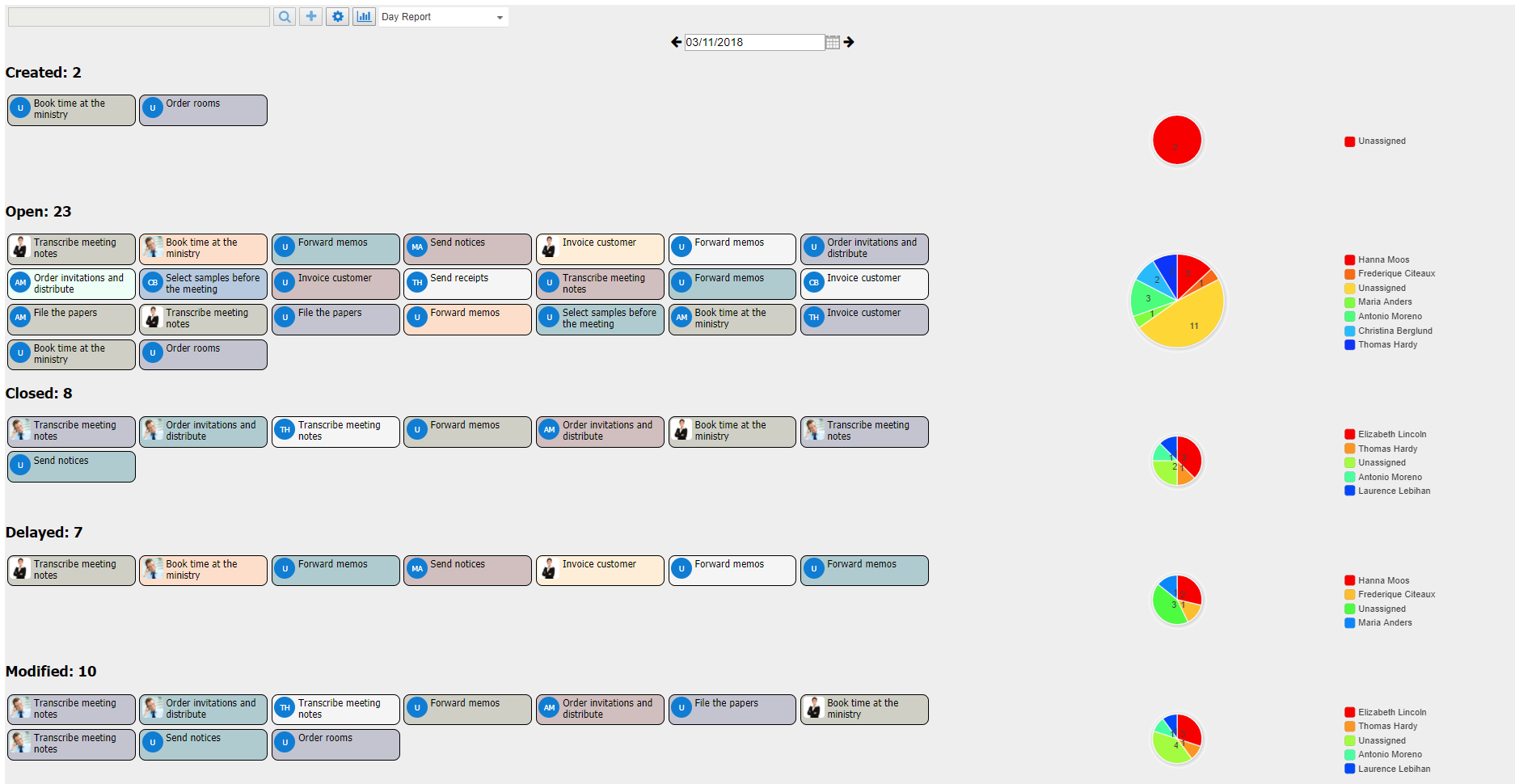
The Day Report shows task activities on a specified day. You can select the date of your choice and view the tasks that were created, open, delayed, modified and closed and also see which people or groups worked with them.
Day Report image
Upgrade
kalmstrom.com Upgrade icon Our subscriptions include support as well as upgrades. If your organization is a subscriber to the Kanban Task Manager sandboxed solution, you are welcome to upgrade it.

Trial and Subscription
kamlstrom.com Trial icon If you have not yet tried Kanban Task Manager for SharePoint, you may download the full version and evaluate it for next 30 days. We provide full support during the evaluation period. Our Support team is always here to help you if you should need any assistance.

You can subscribe to Kanban Task Manager on monthly as well as yearly basis. In case you have any queries regarding product subscriptions, please do not hesitate to contact me or my colleagues at the Sales department.

Dipti Francis
Executive Assistant
kalmstrom.com Business Solutions

05 April 2018

Office 365 from Scratch Updated and Expanded

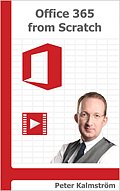
Office 365 from Scratch coverMy book Office 365 from Scratch is now published in a second version. During the year this paperback and e-book has been for sale on Amazon, Microsoft has made many important changes to their online platform. An update was necessary, and in the process I have also added 60 pages with more detailed information.

Purpose
Office 365 has become a huge topic, and everything cannot be covered even in an expanded version of my book. For one of the included parts, SharePoint, I have published a book of its own, SharePoint Online from Scratch, and I could do the same with Power BI, PowerApps and several other services that come with an Office 365 subscription. Maybe I will!

My aim with Office 365 from Scratch is instead to help decision makers and administrators to learn what possibilities the platform gives, to introduce the different parts of Office 365 and specify the right words for the features in apps and services.

Office 365 Sway iconWith such basic knowledge, you will know what things are called and which features are interesting to your organization, so that you can continue your exploration online if needed.

Another goal with Office 365 from Scratch is to describe how different Office 365 apps and services build on or enhance each other. SharePoint is for example used in Office 365 Groups, which in turn is heavily used in Planner, Teams and Stream.

Office 365 Teams icon Online complements
In some cases the book gives links to Microsoft information, but most frequent in the book are the links to my own articles with video demonstrations on kalmstrom.com. I hope these articles will enhance the information in the book.

The articles have been updated as much as my time has allowed it, but I have made the book a priority. All text and all screenshots in Office 365 from Scratch are valid for the latest version of Office 365, and sometimes I also mention Microsoft's future plans for the apps I describe.
Office 365 Sway icon
When I first published Office 365 from Scratch, Teams was just in preview and Video and Sway was very recently launched. Now, one year later, Microsoft has improved Teams and Sway considerably – and decided to withdraw Video!

Microsoft Office 365 Video A new service, Stream, will replace Video, so the Video chapter in my book has of course been replaced with a chapter about Stream. The Teams and Sway articles and demos on kalmstrom.com have been updated, and there is a short Stream article. I will create a Stream demo as soon as possible.

Office 365 Forms icon
Microsoft Forms is another new service, which did not exist at all when I wrote the first edition of Office 365 from Scratch. Now Forms has its own chapter in the book, where I describe how you easily can create and distribute surveys and quizzes and study the results of them.

Thanks to my colleagues
With all work, designing custom solutions as well as updated features in the kalmstrom.com standard products, I would not have had time to update Office 365 from Scratch by myself. My mother Kate has made considerable contributions, and Rituka and Dipti have proof-read everything and given important comments on both language and content.

SharePoint iconThese three did also assist me in the recent update of SharePoint Online from Scratch, so even if I am the author and responsible for all content, my books have been written as a team work. Now we will take on new challenges!

By Peter Kalmström
CEO and Systems Designer
kalmstrom.com Business Solutions

12 March 2018

High Fashion Engagement for kalmstrom.com Manager

The kalmstrom.com team congratulates General Manager, Rituka Rimza, who recently was engaged to Nicky Karamchandani. The engagement, in Hindi called ‘Sagai’ or ‘Mangani’, is one of the pre-wedding rituals in India, where two people exchange rings and formally accept each other in front of family and friends. Below is the happily engaged couple.
RitukaNicky
The engagement was held one day before Rituka’s birthday, so there was another celebration at night after 12am.

The beautiful story begun when these two soul mates met through one of their mutual friends. They shared a good bonding, so the initial few days of friendship were quite enough for them to decide that they could move ahead and turn their friendship into a relationship. After a few meetings with the families, the two were a couple.

Nicky is a professional Fashion Designer, and Rituka is a fashion freak. Isn’t that a perfect combination? 😉 A faithful companion, good understanding and a reliable relationship – what else can anybody need to spend a life in beauty?

RitukaNicky This engagement was one of the most special events in the Rimza family, as Rituka is the youngest and the only sister to her two brothers, Jayant & Vijayant, and now will be married soon. The engagement party was organized at Hotel Bee Town in Indore, where friends and families gathered to celebrate the auspicious occasion. After the ring ceremony, Rituka and Nicky cut the engagement cake. Both the families exchanged gifts, best wishes and blessed the beautiful couple.

The kalmstrom.com team congratulates Rituka and Nicky and wishes them the best of luck for the future.

I hope to be back here in the future with the most exciting stuff from their wedding. Stay tuned!

Dipti Francis
Executive Assistant
kalmstrom.com Business Solutions

21 February 2018

Fifth Edition Of "SharePoint Online From Scratch" Released

SharePoint Online from Scratch cover SharePoint Online develops very fast, and to keep up with Microsoft I have to update my book SharePoint Online from Scratch often. The book is intended for administrators who are new to SharePoint, so it is important that the book describes what they actually see on the screen!

Book and e-book in five editions
The first SharePoint Online from Scratch e-book was published on Amazon in March 2016. The first paperback edition came a month later, and after that there have been several updates. The new edition, published last week, is number 5 already!

Modern interface
Most of the latest update concerns the SharePoint modern interface, which is developing very fast. As Microsoft has promised to keep both the classic and the modern interface side by side, it has been important to me to show the differences and explain when each interface is to prefer.

Manual with progression
Microsoft has a lot of SharePoint instructions online, but they have no real course or manual with a progression. That makes it difficult for beginners, because how can you search for something when you don't even know that it exists? You have to know the possibilities and what things are called, before you can start looking for more information online.

That is where my book comes in. By explaining how SharePoint Online works and how everything is connected, I can give a good base for further exploration online. I also give examples on how you can use your knowledge to enhance typical business process, something that I hope will encourage readers to creative thinking when it comes to their own organizations.

Video tutorials
Variation is important in all learning, and to explain things in a different way I have added links to my own articles with video demonstrations in SharePoint Online from Scratch. I believe this combination of textbook and video is a good way to explain things.

SharePoint Online from Scratch is used in IT training courses, together with the articles. This combination, book + demos + teacher explanations, sounds perfect to me and will surely produce more SharePoint nerds like me!

Practical use
SharePoint Online from Scratch focuses on no-code, hands-on instructions and explanations on how to practically make use of a SharePoint tenant for collaboration within an organization.

But even if I have this practical approach, I also want SharePoint Online from Scratch to give a real understanding of why things are done the way they are. If you have that understanding, it will be easy to figure out how new SharePoint versions work.

E-book or paperback?
If you are interested in my book I recommend that you read more about SharePoint Online from Scratch on the kalmstrom.com website. There I have also gathered some reviews that I am very proud of.

The actual content of the e-book and paperback is the same, but if you buy the digital copy, you will have all images in color and clickable links to the articles.

The paperback of SharePoint Online from Scratch has 430 pages, so I decided to not use color here. That way I can still sell it at a reasonable price. In a hard copy you can give a better layout than in an e-book, which has to fit many formats, so in my opinion the paperback still looks better! And the paperback edition is actually selling even more than the e-book each month.

The best option is of course to buy both editions! If you buy the hard copy from Amazon.com first, you will be offered to buy the digital copy at a very low cost via the Amazon Kindle Matchbook offer.

By Peter Kalmström
CEO and Systems Designer
kalmstrom.com Business Solutions